
Message
Handle customer questions and notes from portal, plugin, and workflows.

Interaction type
Messages are questions or notes from a customer that need a human response or review.
They can come from portal content, plugin actions, a workflow ending, or a customer-facing message form.
Messages appear in Inbox and on the customer timeline. If the customer has an email address and your role allows customer communication, you can respond from the customer details area.
Customer Message Forms
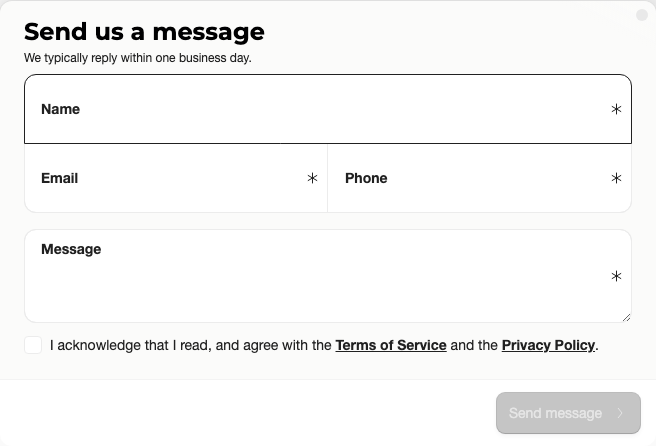
On the portal home page, a message action opens a general form. Use this for broad contact moments such as "Ask Houszo a question", valuation questions, or customer service requests that do not need to be tied to one listing.
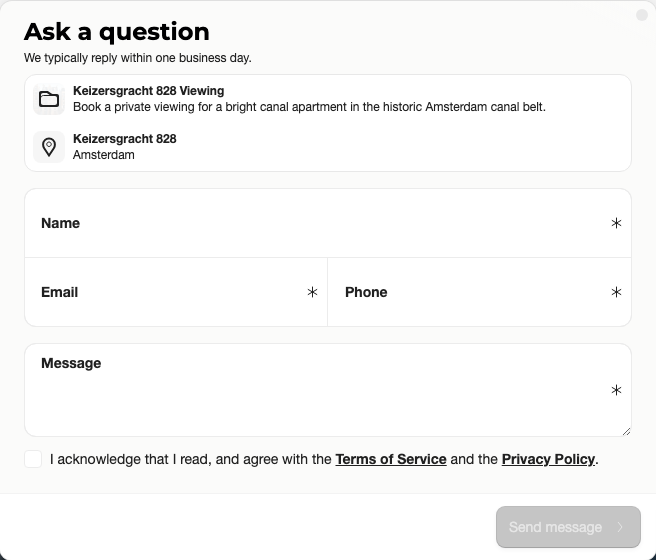
On a project detail page, Ask a question opens the same message form with the project shown in the form header. Use this when the customer is asking about a specific home, bid, document, or viewing.
How to Triage Messages
Start with the message text and source. Portal means the customer used the full customer portal. Plugin means the customer used the embedded website entry point. Standalone means the customer used a focused flow. Admin means the action was created by someone in the dashboard.
Read the questionCheck what the customer asked and whether it belongs to a project, service, or general portal action.
 Open the customer
Review previous appointments, answers, documents, or bid activity before replying.
 Follow up
Reply, call, assign the next action internally, or move to the related project when the answer depends on listing details.
Good Message Setup
Customer-facing message labels should be clear and specific. Instead of a generic "Contact us" everywhere, use labels like "Ask about this home", "Request a valuation", or "Ask a question about your appointment" when the context is known.
Plan and Role Notes
Members need portal access to view message interactions. Customer communication permissions may affect who can respond directly from Sparki.